Onion Diagram Template for PowerPoint and Google Slides
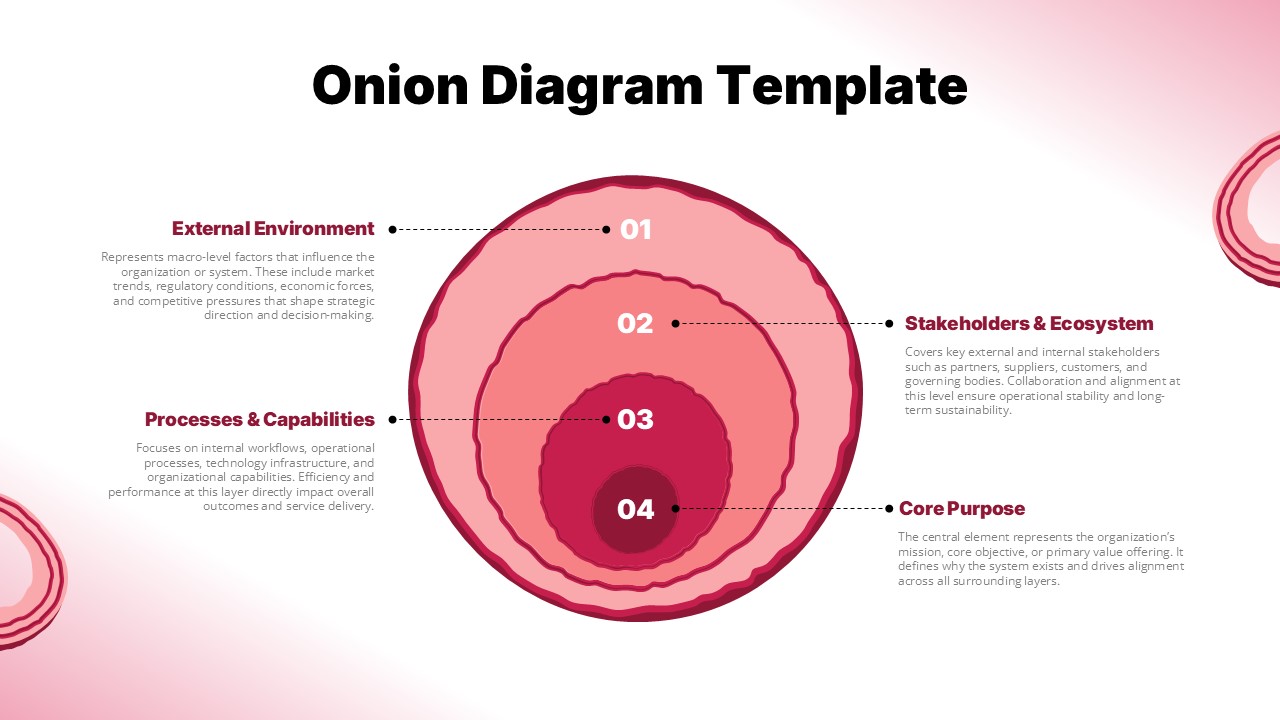
Showing how different layers of an organization, system, or strategy relate to each other requires a clear and structured visual format. A layered circular diagram helps audiences understand how each level connects to and supports the ones around it. The Onion Diagram Template gives presenters a ready-to-use slide layout for mapping layered relationships in a clean and professional format.
This template shows a four-layer concentric circle diagram on a white and pink gradient background. Each ring carries a number from 01 to 04 moving from the outer layer inward. The outermost layer represents the External Environment. The second layer covers Stakeholders and Ecosystem. The third layer addresses Processes and Capabilities. The innermost layer holds the Core Purpose. Each layer links to a labeled callout with a short paragraph description on the left or right side of the diagram.
Both PowerPoint and Google Slides formats are available for this template. Business strategists, organizational consultants, product managers, and corporate teams can use it to present layered structures, strategic frameworks, and system overviews to professional audiences.
What Is This Onion Diagram Template?
The Onion Diagram Template is a single-slide layout built around a four-ring concentric circle diagram. It uses numbered rings to organize content from the outermost context layer down to the core element at the center. Each ring connects to a bold label and a descriptive text block positioned on either side of the diagram.
The outer ring covers macro-level factors such as market trends, regulatory conditions, economic forces, and competitive pressures. The second ring addresses key external and internal stakeholders including partners, suppliers, customers, and governing bodies. The third ring focuses on internal workflows, operational processes, technology infrastructure, and organizational capabilities. The innermost ring represents the organization’s mission, core objective, or primary value offering.
The pink and rose color palette across the rings gives the slide a clean and modern look. Together, these layers form a complete visual for presenting any multi-level structure or system in one organized slide.
When to Use This Template
This template works well when a presenter needs to show how different layers of a system, strategy, or organization relate to a central core. It suits strategic planning sessions, organizational design reviews, and stakeholder mapping presentations. The concentric ring layout clearly separates each level while showing how all layers connect to the center. It is also a good fit for business model overviews, brand architecture presentations, and corporate workshops where a structured layered visual helps audiences understand priorities and relationships quickly.
Customization and Editing Options
All text in this template is fully editable. The slide title, layer numbers, callout labels, and paragraph descriptions on each side of the diagram can all be changed directly in PowerPoint or Google Slides. Each layer label and its matching description can be updated to reflect any layered structure relevant to the presenter’s topic.
The four ring colors use shades of pink and rose. Each ring color can be changed using the shape fill tool in either platform. Users can apply brand colors or a different color scheme to each ring one at a time. In addition, the number of rings can grow or shrink by copying or removing circle shapes within the diagram. The callout connector lines between each ring and its label are also movable and resizable.
Furthermore, the decorative onion ring elements in the slide corners can be removed or repositioned without changing the main diagram. Font size, weight, and text alignment remain easy to adjust throughout the slide.
PowerPoint and Google Slides Compatibility
The Onion Diagram Template works fully with Microsoft PowerPoint and Google Slides. Both formats are ready to use right after download. No extra plugins, fonts, or software are needed for either platform.
The white and pink gradient background, four-ring diagram, callout labels, and connector lines all look the same in both tools. Google Slides users can open and edit the file in a browser and share it with team members for live editing. In contrast, the PowerPoint version works offline and allows more control over shapes, ring colors, and slide effects. The wide 16:9 format shown in the template image carries over to both versions, making it a good fit for screen use, projector display, and online sharing.
See more

Aspect Ratio
16:9Item ID
SKT04521


Features of this template
Other Use Cases of This Template
Strategic planning and business model overview presentations, Organizational structure and design review decks, Stakeholder mapping and ecosystem analysis presentations, Brand architecture and identity layering slides, Product ecosystem and platform structure overviews, Corporate governance and accountability framework decks, Market analysis and competitive landscape presentations, IT and technology infrastructure layering diagrams, Risk management and priority level mapping slides, Customer experience and touchpoint layering presentations, Non-profit mission and program structure overview decks, Consulting firm proposals for organizational transformationFAQs
You May Also Like These Presentation Templates


- Free
- Free

- Free
- Free
- Free
- Free
- Free