Jobs To Be Done Framework Template for PowerPoint and Google Slides
Product teams and UX researchers often need a clear way to present how users interact with a product or service. Showing this in a structured visual format makes it easier for stakeholders to understand user goals and decision steps. The Jobs To Be Done Framework Template gives teams a ready-to-use presentation layout for mapping user tasks, job types, and desired outcomes.
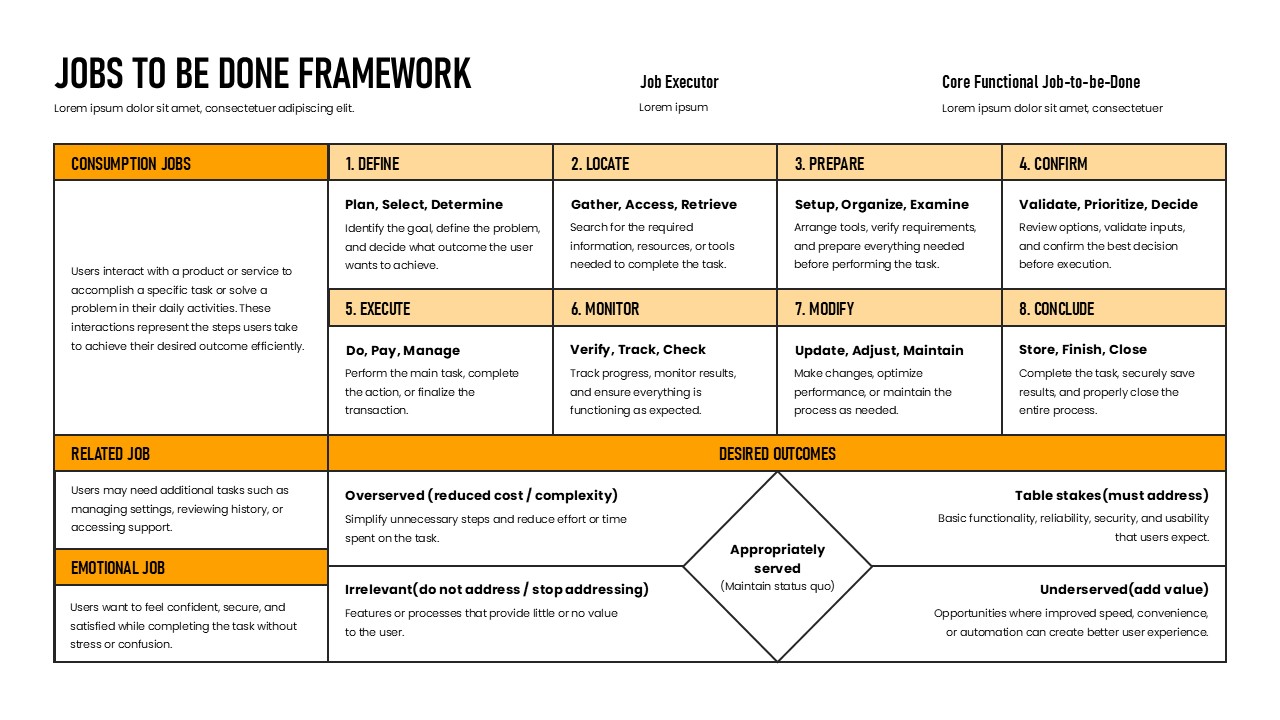
This template features a structured table layout on a white background with yellow and black accents. It organizes content into three job types on the left side. These are Consumption Jobs, Related Jobs, and Emotional Jobs. The main grid covers eight numbered steps. These include Define, Locate, Prepare, Confirm, Execute, Monitor, Modify, and Conclude. A Desired Outcomes section at the bottom shows four outcome categories arranged around a central diamond.
The template also includes header fields for Job Executor and Core Functional Job-to-be-Done. It is available in both PowerPoint and Google Slides. Product managers, UX designers, business analysts, and strategy consultants can use it to present user job mapping, product positioning, and customer need analysis to professional audiences.
What Is This Jobs To Be Done Framework Template?
The Jobs To Be Done Framework Template is a single-slide presentation layout built around a structured grid and outcome diagram. It organizes user interaction into three job categories on the left. These are Consumption Jobs, Related Jobs, and Emotional Jobs. Each category includes a short description of user behavior and goals.
The main content area covers eight sequential steps. Each step includes a label, a set of action verbs, and a brief description. For example, Step 1 is Define, covering Plan, Select, and Determine. Step 5 is Execute, covering Do, Pay, and Manage. This structure helps presenters show a complete picture of how users move through a task.
The Desired Outcomes section at the bottom uses a diamond diagram. It highlights four positions including Overserved, Underserved, Table Stakes, and Irrelevant. Together, these elements make this a complete layout for presenting user job analysis and product strategy in one slide.
When to Use This Template
This template works well when a team needs to present how users approach a specific task or goal within a product or service. It is suited for product discovery sessions, UX research presentations, and product strategy reviews. The structured grid clearly separates job types, task steps, and outcome categories for audiences that need to understand user behavior in a business context. It is also a practical choice for product roadmap planning meetings and innovation workshops where teams need to align on user needs and priorities.
Customization and Editing Options
All text fields in the template are fully editable. This includes the slide title, Job Executor field, Core Functional Job-to-be-Done field, job category descriptions, step labels, action verb lines, and step descriptions. Each of the eight step cells can be updated with task-specific content relevant to any product or service.
The yellow accent color used in the header row and job category labels can be changed using the shape fill option in PowerPoint or Google Slides. Users can apply a brand color to replace yellow without affecting the table structure. Additionally, the Desired Outcomes diamond and its four surrounding labels are individually editable. Each quadrant text can be updated to reflect specific outcome categories for a given product or market.
The three job type rows on the left side can also be relabeled and redescribed. Teams can add or remove rows to match the number of job types relevant to their specific use case. Font size and weight are adjustable throughout.
PowerPoint and Google Slides Compatibility
The Jobs To Be Done Framework Template is fully compatible with Microsoft PowerPoint and Google Slides. Both formats are available for immediate download and use. No additional plugins, fonts, or software are required for either platform.
The white background, yellow header accents, black typography, and diamond diagram layout render consistently across both platforms. Google Slides users can open and edit the file directly in a browser. They can also share it with team members for real-time collaboration. Meanwhile, the PowerPoint version supports offline editing and further customization of shapes, table styles, and transitions. The widescreen 16:9 format shown in the template image is maintained in both versions.
See more

Aspect Ratio
16:9Item ID
SKT04577


Features of this template
Other Use Cases of This Template
Product discovery and user research presentation decks, UX design review and team alignment sessions, Product strategy and roadmap planning presentations, Customer needs analysis and segmentation decks, Innovation workshop and design thinking facilitation slides, Go-to-market strategy presentations for new products, Startup pitch decks covering user problem and solution fit, Agile sprint planning and backlog prioritization sessions, Business analyst project scoping and requirements presentationsFAQs
You May Also Like These Presentation Templates

- Free

- Free


- Free

- Free
- Free
- Free