Historical Timeline Template for PowerPoint and Google Slides
Presenting a sequence of events or milestones requires a clear and structured visual format. A horizontal timeline helps audiences follow dates and key stages without relying on dense text or tables. The Historical Timeline Template gives presenters a ready-to-use slide layout for displaying dates and events in a clean and professional format.
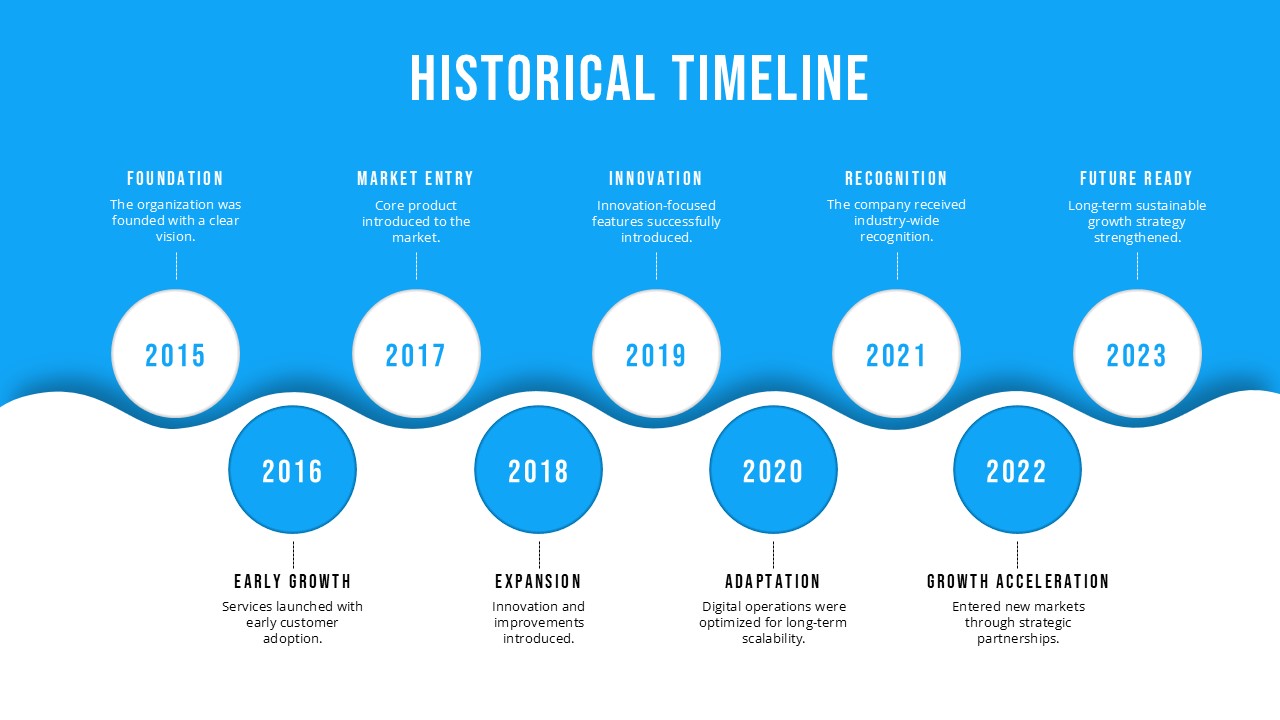
This template shows a bold blue background with a wave shape running across the center of the slide. Nine circular year markers span from 2015 to 2023. Odd-year circles sit above the wave in white with blue text. Even-year circles sit below the wave in solid blue with white text. Each circle links to a milestone label and a short description. Upper labels include Foundation, Market Entry, Innovation, Recognition, and Future Ready. Lower labels include Early Growth, Expansion, Adaptation, and Growth Acceleration.
Both PowerPoint and Google Slides formats are available for this template. Corporate teams, project managers, historians, teachers, and business professionals can use it to present company timelines, project histories, and event sequences to any audience.
What Is This Historical Timeline Template?
The Historical Timeline Template is a single-slide layout built around a wave-divided circular milestone diagram. It places events in a clear left-to-right flow using circles above and below a wave divider. White circles above the wave show odd-year milestones with labels and descriptions above them. Solid blue circles below the wave show even-year milestones with labels and text below.
Each milestone includes a year inside the circle, a short bold heading, and a one-to-two sentence note. The wave design guides the audience through each stage in order. Moreover, the bright blue background and white text give the slide a clean, high-contrast look for corporate settings. Together, these parts make this a complete one-slide layout for showing a multi-year history or project timeline.
When to Use This Template
This template works well when a presenter needs to show the progress of events or key stages across several years. It suits company history slides, project reviews, and planning decks where a clear date-based overview is needed. The upper and lower milestone layout helps audiences track each stage without the slide feeling too busy. It is also a good fit for annual reports, investor updates, and leadership slides where a visual summary of growth adds useful context.
Customization and Editing Options
All text in this template is fully editable. The slide title, milestone labels, year numbers, and short notes can all be changed directly in PowerPoint or Google Slides. Year values inside the circles can be updated to match any time range that fits the content.
The number of milestone circles can grow or shrink by copying or deleting circle shapes. The blue background color can change using the slide background fill tool in either platform. Circle colors for both the white upper circles and the solid blue lower ones are easy to update using the shape fill option. In addition, the wave shape can be moved or restyled to shift the balance between the upper and lower sections.
Font size, weight, and text style are also easy to adjust throughout the slide. Furthermore, the milestone notes can be made longer or shorter based on how much detail the presenter needs.
PowerPoint and Google Slides Compatibility
The Historical Timeline Template works fully with Microsoft PowerPoint and Google Slides. Both formats are ready to use right after download. No extra plugins, fonts, or software are needed for either platform.
The blue background, wave divider, circle layout, and white text all look the same in both tools. Google Slides users can open and edit the file in a browser and share it with their team for live editing. In contrast, the PowerPoint version works offline and allows more control over shapes, colors, and slide effects. The wide 16:9 format shown in the template image carries over to both versions, making it a good fit for screen use, projector display, and online sharing.
See more

Aspect Ratio
16:9Item ID
SKT04517


Features of this template
Other Use Cases of This Template
Company history and founding story presentations, Product launch and development milestone timelines, Project review and recap decks, Investor and stakeholder update presentations, Annual report summary and highlight slides, Strategic planning and roadmap overview decks, Brand history and identity change presentations, Academic and research project progress timelines, Government program milestone overview slides, Non-profit impact and growth presentations, History and chronology lesson slides for students, Marketing campaign planning and execution timelines, Digital change and technology adoption journey decksFAQs
You May Also Like These Presentation Templates

- Free
- Free
- Free
- Free

- Free
- Free
- Free
- Free
- Free
- Free
- Free
- Free
- Free
- Free
- Free
- Free