Attribute-Based Access Control Diagram Template for PowerPoint & Google Slides
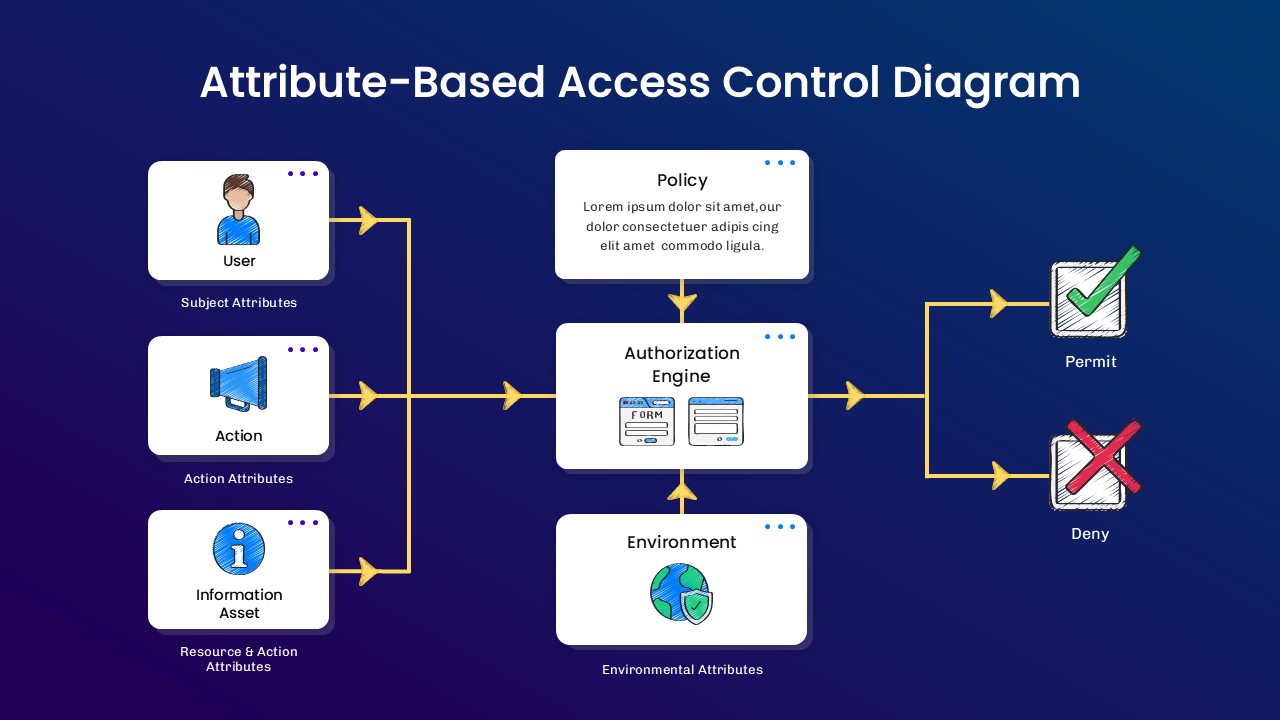
The Attribute-Based Access Control Diagram Template is a structured presentation design created to illustrate access control logic using attribute-driven decision flow. The template visually maps user, action, information asset, policy, authorization engine, and environment elements in a connected diagram format. It includes labeled sections for subject attributes, action attributes, resource attributes, and environmental attributes. The layout clearly shows how these components move through an authorization engine to produce permit or deny outcomes. The design supports technical discussions, security architecture reviews, and compliance briefings. Arrows and boxed sections help present system relationships in a clear sequence. The slide keeps technical information organized without overcrowding the layout. This template is fully compatible with PowerPoint and Google Slides for IT and business presentations.
What Is This Attribute-Based Access Control Diagram Template?
This Attribute-Based Access Control Diagram Template is a ready-made diagram slide built to present ABAC system structure in a visual format. It organizes key components such as user attributes, actions, information assets, policy rules, and environmental conditions into a logical flow. The template highlights how these inputs move into an authorization engine. It visually represents access decisions through permit and deny outputs. The layout helps teams explain access control architecture in a structured way. It serves as a business presentation template for cybersecurity and IT governance topics.
When to Use This Template
Use this template when presenting access control models, cybersecurity frameworks, or system authorization processes. It is suitable for IT strategy meetings, security audits, compliance reviews, and technical training sessions. The diagram layout supports clear explanation of attribute-based decision flows to both technical and business audiences.
Customization and Editing Options
Users can edit all labels, headings, and attribute descriptions in PowerPoint or Google Slides. Colors can be updated to match corporate branding. Diagram shapes and arrows can be resized or repositioned to fit additional details. Permit and deny outputs can be adjusted to reflect organization-specific terminology. Additional slides can be duplicated to expand the access control explanation.
PowerPoint and Google Slides Compatibility
This template works smoothly in Microsoft PowerPoint and Google Slides. The diagram structure remains consistent across both platforms. It supports in-person technical reviews, virtual security briefings, and internal IT presentations.
See more

Aspect Ratio
16:9Item ID
SKT04420


Features of this template
Other Use Cases of This Template
Cybersecurity architecture presentations, IT governance meetings, Security policy workshops, Risk management briefings, Compliance reporting sessions, Cloud security discussions, Identity and access management reviews, Enterprise system design meetings, Software security training, Data protection strategy presentations, Business technology alignment sessions, Professional Google Slides templates for IT decksFAQs
You May Also Like These Presentation Templates

- Free
- Free
- Free

- Free
- Free
- Free
- Free
- Free