Berlo’s SMCR Model of Communication Template for PowerPoint & Google Slides
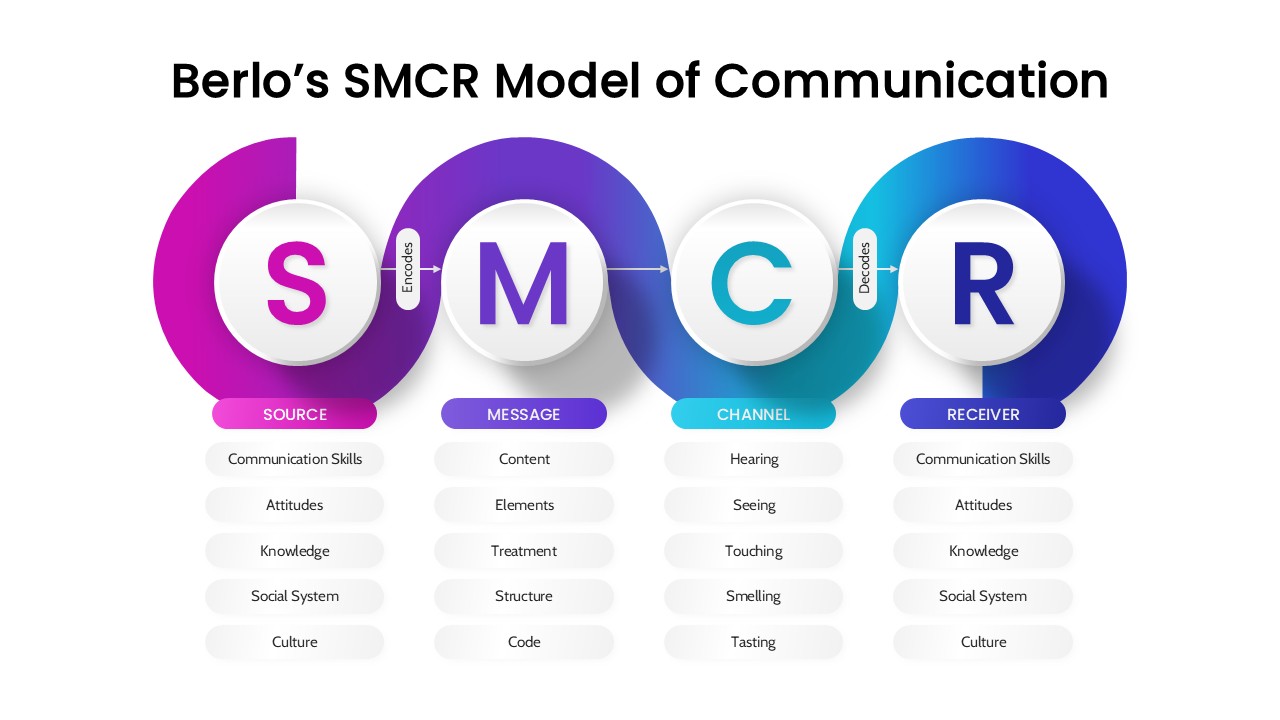
The Berlo’s SMCR Model of Communication Template is a structured presentation design created to present the Source, Message, Channel, and Receiver framework in a clear visual format. The template features a connected flow layout that highlights each component with distinct color sections and labeled headings. It includes space to present key factors under Source, Message, Channel, and Receiver in an organized manner. The design supports academic lectures, corporate training sessions, and communication workshops. Each section allows presenters to outline core elements in a readable and structured way. The visual flow helps audiences follow the communication process from sender to receiver. The layout keeps text aligned under each component without clutter. This template works in both PowerPoint and Google Slides for classroom or professional use.
What Is This Berlo’s SMCR Model of Communication Template for PowerPoint and Google Slides?
This Berlo’s SMCR Model of Communication Template is a ready-made presentation layout built to display the four core components of the SMCR framework. It provides structured sections for Source, Message, Channel, and Receiver with supporting bullet areas under each heading. The design visually connects each stage to reflect the communication flow. It allows presenters to organize key points under each element clearly. The template is suitable for theory explanation, training sessions, and structured presentations. It serves as a business presentation template for communication-focused discussions.
When to Use This Template
Use this template when presenting communication models in academic classes, leadership programs, corporate training, or business workshops. It fits sessions where a clear breakdown of sender, message, medium, and receiver is required. The layout supports structured explanation in both educational and professional settings.
Customization and Editing Options
Users can edit all headings and bullet text in PowerPoint or Google Slides. Colors can be adjusted to match brand guidelines or academic themes. Text boxes can be expanded or reduced depending on content length. Additional slides can be duplicated to add examples or case discussions. Fonts and shapes can be modified using standard slide tools.
PowerPoint and Google Slides Compatibility
This template is compatible with Microsoft PowerPoint and Google Slides. The structure and visual flow remain consistent across both platforms. It supports in-person presentations, virtual classes, and online workshops.
See more

Aspect Ratio
16:9Item ID
SKT04405


Features of this template
Other Use Cases of This Template
Business communication training sessions, Corporate workshop presentations, Management training programs, Leadership development seminars, HR onboarding sessions, University communication lectures, Marketing communication briefings, Public speaking workshops, Internal team alignment meetings, Consulting presentations, Business strategy discussions, Professional Google Slides templates for training decksFAQs
You May Also Like These Presentation Templates


- Free

- Free
- Free
- Free
- Free
- Free
- Free
- Free
- Free
- Free
- Free