Kano Model Diagram Slide for PowerPoint & Google Slides
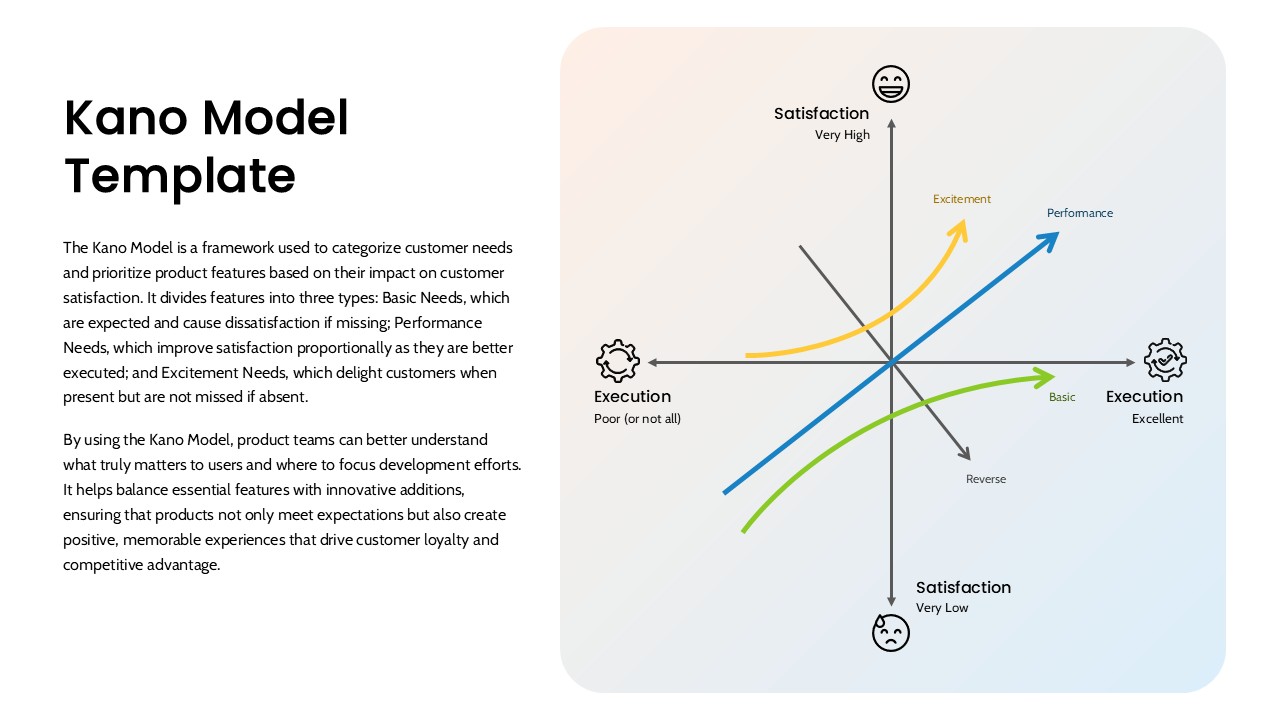
Use this Kano Model diagram slide to visually categorize customer needs and strategically prioritize product features based on their impact on user satisfaction. The slide features a clear two-axis graph mapping Execution (horizontal) and Satisfaction (vertical), with color-coded curves representing the three core Kano categories: Basic Needs (green), Performance Needs (blue), and Excitement Needs (orange). Supporting elements include concise labels, expressive satisfaction icons, and gear symbols to highlight functionality, making the visual highly intuitive for decision-making.
The left side of the slide includes a brief yet insightful explanation of the Kano Model framework, helping audiences quickly grasp the concept. With a clean, gradient-backed design and a well-balanced layout, this template makes it easy to communicate how different feature types affect customer delight or dissatisfaction. Ideal for strategy reviews, product planning sessions, and stakeholder meetings, it turns abstract product decisions into concrete visual narratives.
Fully editable in both PowerPoint and Google Slides, this asset empowers teams to tailor the model to specific use cases or industries. The diagram not only guides innovation and feature development but also sharpens focus on what truly drives user satisfaction and loyalty.
See more

Aspect Ratio
16:9Item ID
SKT04153


Features of this template
Other Uses
Can be reused in innovation workshops, feature roadmap discussions, service design training, or business case presentations. Also ideal for pitching user-focused product strategies to executives or clients.
FAQs
You May Also Like These Presentation Templates

- Free