Email Journey Mapping Presentation Template
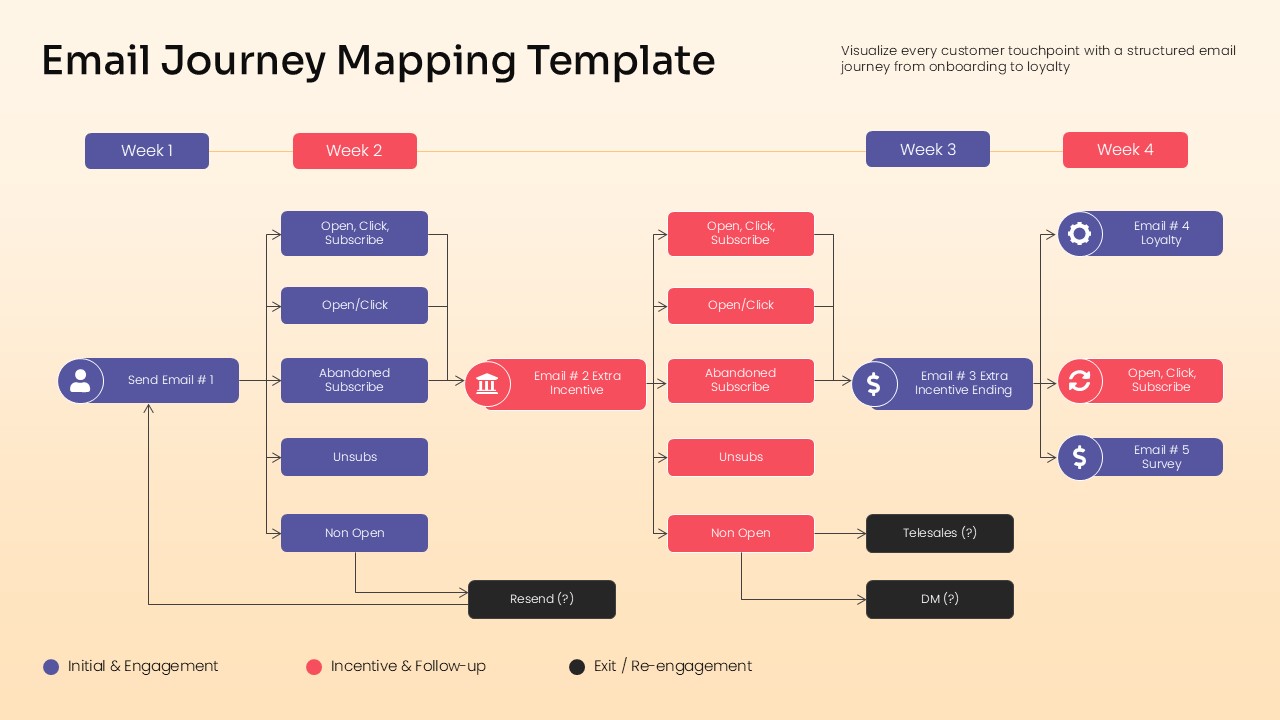
The Email Journey Mapping Template is a professional and easy-to-edit presentation design for visualizing customer email journeys, marketing automation workflows, and email communication strategies. It helps businesses understand how customers interact with emails at different stages of their journey. From the first engagement email to follow-up campaigns and customer loyalty messages, this template provides a clear visual overview of the entire email marketing process.
The template features a structured four-week timeline that organizes email activities into different stages. Each stage is connected through directional arrows, making it easy to understand how customers move from one interaction to another. The workflow begins with an initial engagement email and follows customer responses such as opens, clicks, subscriptions, unsubscribes, and non-open interactions. Based on these actions, marketers can plan appropriate follow-ups, incentives, and re-engagement campaigns.
Available for Microsoft PowerPoint and Google Slides, this template is fully editable and easy to customize. You can change the email stages, update the timeline, modify the labels, and adjust the workflow according to your marketing objectives. You can also add new touchpoints, remove unnecessary steps, and personalize the color scheme to match your brand identity.
Use this Email Journey Mapping PowerPoint and Google Slides Template to plan smarter email campaigns and improve customer engagement. Its flexible design makes it easier to present marketing workflows and build effective customer communication strategies.
See more

Aspect Ratio
16:9Item ID
SKT04787


FAQs
You May Also Like These Presentation Templates


- Free
- Free
- Free
- Free